
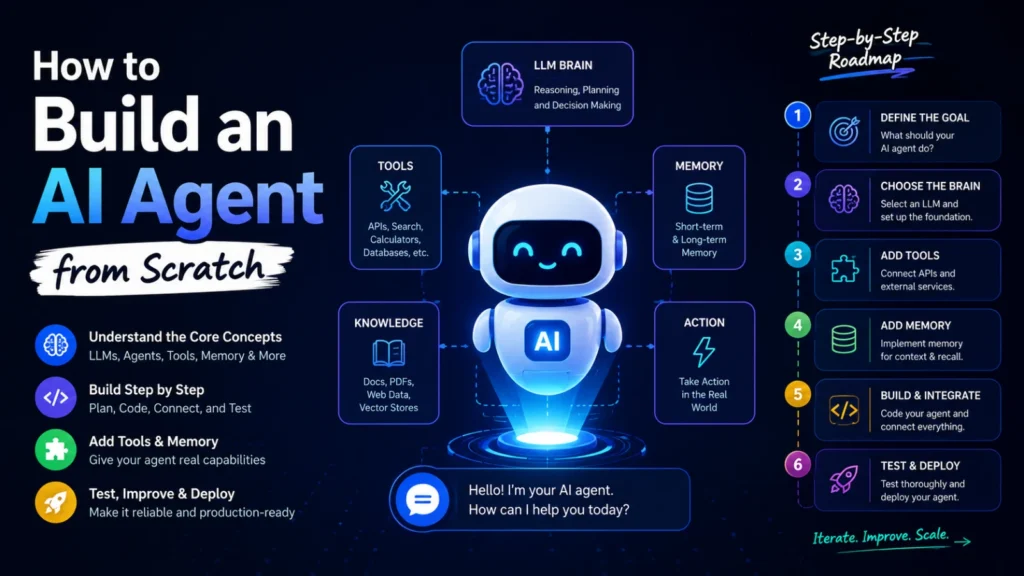
Artificial Intelligence is changing how businesses automate tasks, engage customers, and improve productivity. AI agents are now capable of answering questions, searching databases, making decisions, and even completing complex workflows with minimal human intervention.
Whether you’re a developer, business owner, or AI enthusiast, learning how to build an AI agent from scratch is a valuable skill. This guide walks you through the essential components, development process, and best practices for creating an intelligent AI agent.
What Is an AI Agent?
An AI agent is a software program that can perceive information, reason about it, make decisions, and perform actions to achieve a specific goal. Unlike a basic chatbot, an AI agent can remember previous interactions, use external tools, retrieve knowledge, and complete tasks autonomously.
Examples include:
- Customer support assistants
- Sales and lead generation agents
- Personal productivity assistants
- AI coding assistants
- Research and data analysis agents
Core Components of an AI Agent
1. LLM Brain
The Large Language Model (LLM) serves as the brain of the AI agent.
It enables the agent to:
- Understand user requests
- Generate human-like responses
- Plan actions
- Make logical decisions
- Solve complex problems
Popular LLMs include GPT models, Claude, Gemini, and open-source alternatives.
2. Tools
AI agents become significantly more powerful when connected to external tools.
Examples include:
- APIs
- Web search
- Calculators
- Databases
- Email systems
- CRM platforms
- Calendar applications
These integrations allow the AI agent to perform real-world tasks instead of simply generating text.
3. Memory
Memory enables AI agents to remember previous conversations and important information.
There are two common types:
Short-Term Memory
Used during the current conversation to maintain context.
Long-Term Memory
Stores information over time, allowing personalized responses and improved decision-making.
Memory creates a more natural and intelligent user experience.
4. Knowledge Base
A knowledge base provides the AI with reliable information.
Common knowledge sources include:
- Company documentation
- PDF files
- Websites
- Internal databases
- Vector databases
- Product manuals
Rather than relying only on model training, AI agents retrieve current information when needed.
5. Action Layer
The action layer allows the AI agent to perform tasks in the real world.
Examples include:
- Sending emails
- Creating reports
- Booking meetings
- Updating CRM records
- Processing customer requests
- Executing workflows
This is where AI becomes a true automation assistant.
Step-by-Step Guide to Building an AI Agent
Step 1: Define the Goal
Before writing any code, clearly define your agent’s purpose.
Ask yourself:
- What problem will it solve?
- Who will use it?
- What tasks should it automate?
A clearly defined objective makes development easier.
Step 2: Choose the Right LLM
Select a language model based on your needs.
Consider:
- Accuracy
- Cost
- Speed
- Context window
- API availability
- Privacy requirements
The right LLM forms the foundation of your AI agent.
Step 3: Add Tools
Connect your AI agent with useful services.
Examples include:
- Google Search
- Weather APIs
- CRM software
- Databases
- Payment gateways
- Slack
- Microsoft Teams
Tool integration greatly expands your agent’s capabilities.
Step 4: Implement Memory
Memory enables better conversations and personalization.
Store:
- User preferences
- Conversation history
- Frequently used information
- Business context
This helps the AI provide consistent and relevant responses.
Step 5: Build and Integrate
Develop the application’s backend and frontend.
Common technologies include:
- Python
- JavaScript
- FastAPI
- Node.js
- LangChain
- LlamaIndex
- OpenAI API
- Vector databases
Integrate all components into a single workflow.
Step 6: Test and Deploy
Before launching your AI agent:
- Test different user scenarios
- Measure response accuracy
- Optimize prompts
- Monitor latency
- Improve reliability
- Secure API keys
- Collect user feedback
Continuous improvement is key to long-term success.
Best Practices for AI Agent Development
To build a reliable AI agent:
- Keep prompts clear and structured.
- Use Retrieval-Augmented Generation (RAG) for accurate information.
- Secure sensitive data and API credentials.
- Add guardrails to reduce hallucinations.
- Monitor performance and costs.
- Continuously refine prompts and workflows.
- Test with real users before production deployment.
Benefits of AI Agents
Organizations are increasingly adopting AI agents because they can:
- Automate repetitive tasks
- Improve customer support
- Increase productivity
- Reduce operational costs
- Generate qualified leads
- Enhance employee efficiency
- Deliver personalized experiences
- Operate 24/7
The Bottom Line
Building an AI agent from scratch is no longer limited to AI researchers. With modern LLMs, APIs, memory systems, and development frameworks, businesses and developers can create intelligent assistants that automate workflows, improve customer experiences, and drive business growth.
Start with a clear goal, choose the right language model, connect useful tools, implement memory, build carefully, and continuously improve your AI agent through testing and feedback.
Frequently Asked Questions
What is an AI agent?
An AI agent is an intelligent software application that understands user requests, makes decisions, and performs tasks using AI models, memory, and external tools.
What is the difference between an AI chatbot and an AI agent?
A chatbot mainly answers questions, while an AI agent can reason, use tools, remember context, and complete actions such as sending emails or updating databases.
Which programming language is best for building AI agents?
Python is the most popular choice because of its extensive AI libraries, though JavaScript and TypeScript are also widely used.
Do AI agents need memory?
Yes. Memory helps AI agents maintain context, remember user preferences, and deliver more personalized and accurate responses.
What tools can an AI agent use?
AI agents can connect to APIs, databases, search engines, CRMs, calendars, email platforms, and many other business applications.
Can I build an AI agent without machine learning experience?
Yes. Modern AI platforms and APIs allow beginners to build capable AI agents without training their own machine learning models.
How long does it take to build an AI agent?
A basic AI agent can be built in a few hours or days, while enterprise-grade agents with advanced integrations may take several weeks or months.
Are AI agents secure?
They can be secure if you implement proper authentication, encrypt sensitive data, manage API keys safely, and follow AI security best practices.
What industries use AI agents?
AI agents are widely used in healthcare, finance, e-commerce, education, customer service, marketing, software development, and human resources.
What is the future of AI agents?
AI agents are expected to become more autonomous, multimodal, collaborative, and deeply integrated into business processes, making them a key technology for digital transformation in the coming years.
