
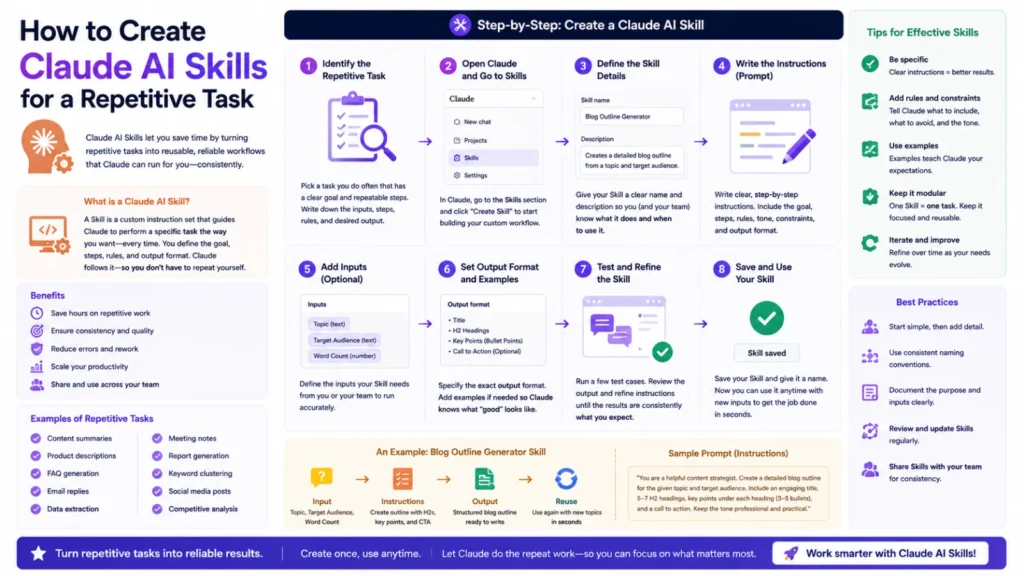
Some tasks come up again and again in the same shape. Weekly reports, formatting checks, or a specific research workflow. Instead of re-explaining the process every time, you can package it. That package is called a Claude skill. Here’s how to actually build one.
What a Claude Skill Actually Is
A skill is a set of packaged, reusable instructions for Claude. It describes exactly how to complete a specific kind of task. Skills get triggered automatically when a request matches their description. They can also get triggered directly by name, like a command. Think of it as teaching Claude your repeatable process once.
When a Repetitive Task Is Worth Turning Into a Skill
Not every task needs its own skill built for it. Good candidates repeat often and follow a consistent, describable process. If you find yourself typing the same instructions weekly, that’s a signal. If a task has clear steps and a clear output, even better. One-off or highly variable tasks usually aren’t worth the effort.
Step 1: Identify the Exact Repetitive Task
Start by naming the task as specifically as possible. Vague scope leads to a vague, unreliable skill later. Write down exactly what triggers the task and what output it produces. Note any tools, files, or formats the task consistently relies on. This clarity makes every following step much easier.
Step 2: Write Clear, Step-by-Step Instructions
Break the task into explicit, ordered steps Claude can follow. Avoid assuming context that isn’t written down directly. Include specific formatting rules, naming conventions, or required checks. If the task has edge cases, describe how to handle them too. Clear instructions here prevent inconsistent results later.
Step 3: Give It a Specific, Triggerable Description
A skill needs a description that clearly signals when to use it. Include the phrases and situations someone would naturally use to request it. A vague description leads to the skill triggering at the wrong times. A too-narrow description means it rarely triggers when it should. This step matters more than most people expect.
Step 4: Use a Skill-Creation Tool to Build It
Rather than writing every file by hand, use a dedicated skill-creation skill. It walks through structuring instructions, naming, and description writing properly. This keeps the skill’s format consistent with how Claude expects to read it. It also helps catch missing details before the skill gets used for real.
Step 5: Test the Skill on Real Examples
Run the skill against actual, real examples of the repetitive task. Don’t just test the easiest, most obvious case available. Try edge cases and slightly unusual variations of the same task. Watch closely for where the instructions get misread or skipped.
Step 6: Refine Based on What Goes Wrong
Every skill needs adjustment after its first real test runs. If output is inconsistent, the instructions probably need more specific detail. If it triggers at the wrong times, revisit the description wording. Treat this as an ongoing process, not a one-time setup task.
The Bottom Line
Turning a repetitive task into a Claude skill saves real, recurring time. It works best for tasks with a clear, consistent, describable process. Building one takes specific instructions, a well-written description, and honest testing. Refining it after real use is just as important as the initial build. Done well, a sk
Frequently Asked Questions
Do I need coding experience to create a Claude skill?
No. Skills are written as plain instructions, not code. A skill-creation tool can guide you through the structure.
How is a skill different from just writing a detailed prompt?
A prompt gets typed fresh every time you need it. A skill gets saved once and triggers automatically afterward.
What happens if my skill’s description is too vague?
It may trigger at the wrong times, or not trigger when needed. A specific, clear description avoids both problems.
Can one skill handle multiple related repetitive tasks?
It’s usually better to keep skills narrow and specific. Multiple focused skills work more reliably than one broad one.
How many times should I test a skill before relying on it?
Test it across several real examples, including unusual edge cases. One successful run isn’t enough to confirm it’s reliable.
Can I update a skill after it’s already being used?
Yes. Skills can be refined anytime based on real results. Treat early versions as a draft, not a final product.
