
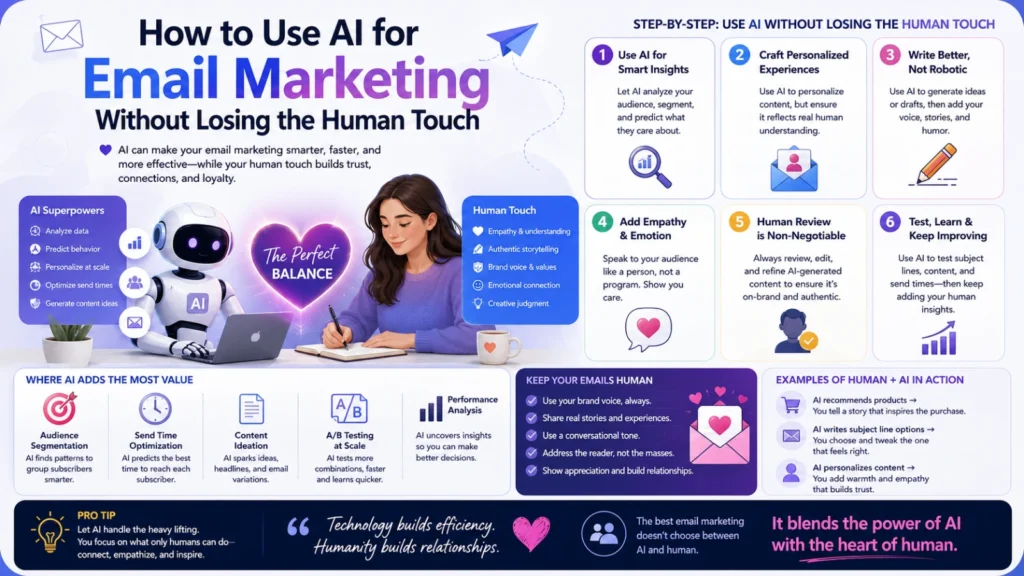
AI has made email marketing faster in almost every way. Subject lines, send times, and segmentation can now be optimized automatically. But there’s a real risk hiding in that convenience. Emails can start sounding generic, robotic, or oddly disconnected from your actual brand voice.
The good news is this isn’t really an AI problem. It’s a workflow problem. Used thoughtfully, AI speeds up email marketing without stripping out the personality that makes people actually want to open your emails.
Why This Tension Exists in the First Place
AI models are trained to produce broadly acceptable, safe, average-sounding text. That’s genuinely useful for grammar, structure, and speed. But “broadly acceptable” is almost the opposite of what makes an email feel personal. Great email marketing usually has a distinct voice, specific opinions, and a sense of who’s actually writing it. Left unchecked, AI tends to smooth all of that away.
Where AI Genuinely Helps
Drafting Faster First Versions
Staring at a blank page is often the biggest time sink in email writing. AI can produce a solid first draft in seconds based on your outline or key points. That draft still needs editing, but it removes the blank-page problem entirely.
Subject Line and Send Time Testing
AI-powered tools can generate dozens of subject line variations quickly for testing. They can also analyze historical open data to suggest better send times. This kind of pattern-based optimization is exactly what AI does well.
Segmentation and Personalization at Scale
AI can analyze customer behavior and group subscribers into meaningful segments automatically. It can also personalize details like product recommendations within a template. That’s personalization at a scale no person could realistically do manually.
Cleaning Up Grammar and Structure
AI is genuinely reliable at catching typos, awkward phrasing, and structural issues. This is one of the lowest-risk, highest-value uses of AI in the entire process.
Repurposing Content Across Formats
Turning a blog post into an email, or a webinar into a follow-up sequence, is tedious manual work. AI can handle that repurposing quickly, giving you a solid starting draft to edit.
Where AI Tends to Hurt the Human Touch
Generic, Interchangeable Voice
Unedited AI copy often reads like it could have come from any brand. Phrases like “we’re thrilled to announce” show up constantly across totally different companies. That sameness is exactly what erodes the personal feel subscribers actually respond to.
Overly Polished, Emotionless Language
AI tends to smooth out rough edges, including the ones that make writing feel human. A slightly imperfect sentence with real personality often outperforms a perfectly polished but flat one.
Losing Specific Stories and Details
AI can’t invent a real customer story, a specific inside joke, or an actual event from your business. Those specific, true details are usually what makes an email memorable rather than skippable.
Missing Context and Timing Sensitivity
AI doesn’t inherently know that today isn’t the right day for a cheerful sales email. A human editor catches timing and tone mismatches that automation alone tends to miss entirely.
A Practical Workflow That Keeps Both
Start with a clear brief, not a blank AI prompt. Give the AI your key message, audience, and tone before asking it to write anything. Let AI produce the first draft, then edit it heavily rather than sending it as-is. Add one specific, real detail — a customer story, a specific number, a genuine opinion. Read the email out loud before sending it anywhere. If it doesn’t sound like a real person, it probably needs another pass. Use AI for the repetitive parts: subject line testing, segmentation, and send-time optimization. Keep a human directly involved in tone, timing, and anything emotionally sensitive.
Building an Actual Brand Voice Guide for AI
One of the most effective fixes is surprisingly simple. Write a short, specific brand voice guide and feed it to your AI tool consistently. Include real example sentences that sound like you, and ones that clearly don’t. This single step dramatically improves how “human” AI-assisted drafts feel from the very first version.
The Bottom Line
AI hasn’t made the human touch in email marketing optional. It’s made it more important, precisely because AI-generated text is now so easy to spot. The businesses getting real value from AI in email marketing use it for speed, testing, and scale. They keep a human firmly in charge of voice, timing, and the specific details that make an email feel genuinely written by someone.
Frequently Asked Questions
Can subscribers actually tell when an email was written by AI?
Often, yes, especially with unedited output. Generic phrasing and overly polished language tend to give it away quickly. Editing AI drafts for specific detail and real voice makes this far less noticeable.
Should I disclose that AI helped write my marketing emails?
There’s no universal rule requiring disclosure for typical marketing copy. Some brands do mention AI-assisted workflows for transparency, but it isn’t standard practice. Using AI as a drafting tool with human editing is generally seen as normal.
Is it safe to let AI send emails without any human review?
Fully automated sending without any review carries real risk, especially for tone-sensitive or timely content. A quick human check before sending catches context issues AI can easily miss.
How much editing does an AI-drafted email usually need?
It varies, but expect meaningful editing rather than a quick glance. Adding specific details, adjusting tone, and tightening structure usually takes real, deliberate effort.
Can AI help maintain a consistent brand voice across a marketing team?
Yes, if you give it a clear voice guide and real examples to work from. Without that guidance, different team members using AI can drift toward a flatter, more generic tone.
What’s the biggest mistake businesses make with AI email marketing?
Sending AI output with little or no editing is the most common mistake. That’s usually
