
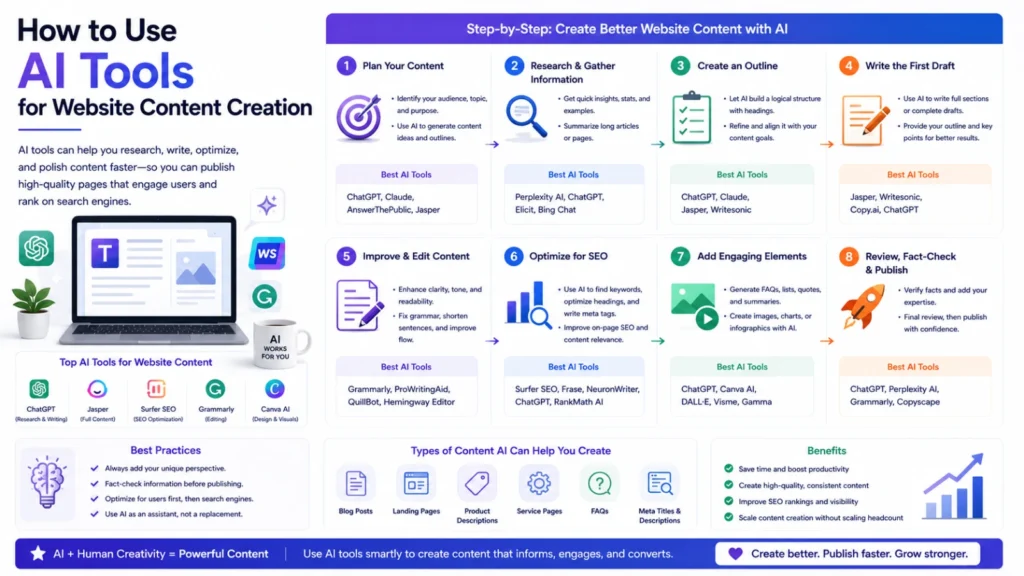
Creating website content used to mean hours of manual drafting. AI tools now handle much of that heavy lifting instead. Used well, they speed things up without sacrificing quality. Here’s a practical step-by-step approach worth following.
Start With a Clear Brief, Not a Blank Prompt
Vague prompts produce vague, generic content every time. Before writing anything, define the topic, audience, and goal clearly. Note the target keyword and desired tone as well. Feed that brief into an AI assistant like Claude or ChatGPT. A specific brief consistently produces a far stronger first draft.
Use AI for Research Before Drafting
Good content starts with solid research, not guesswork. Tools like Perplexity can quickly summarize sources on a topic. Ask for key facts, common questions, and competing viewpoints upfront. This research step shapes a stronger outline before any drafting begins. Skipping it usually shows up as thin, shallow content later.
Generate an Outline First, Then the Draft
Jumping straight to a full draft often produces messy structure. Ask your AI tool for a clear outline first instead. Review and adjust that outline before generating any actual paragraphs. Once it’s solid, generate the full draft section by section. This two-step process saves significant editing time afterward.
Check Keyword Coverage With an SEO Tool
Once a draft exists, run it through an SEO tool. Surfer SEO or Clearscope can flag missing related terms. They also suggest an appropriate length based on top-ranking pages. Add gaps naturally, without forcing awkward keyword stuffing into sentences. This step keeps content thorough without hurting actual readability.
Edit for Voice, Accuracy, and Clarity
AI drafts often sound generic without a distinct human voice. Rewrite sections so they sound like your actual brand. Fact-check every specific claim, statistic, or date the AI included. AI tools can generate confident-sounding details that are simply wrong. This editing pass is the most important step in the process.
Run It Through a Grammar and Readability Pass
Grammarly or Hemingway Editor catches leftover errors and clunky sentences. They also flag passive voice and overly long sentences. This step polishes the draft without needing a full manual reread. It’s fast, but it shouldn’t entirely replace real human editing.
Add Visuals and Structured Data
Strong website content usually needs supporting images or diagrams too. AI image tools can generate custom visuals when needed. Add schema markup so search engines and AI systems understand context clearly. FAQPage, Article, and Organization schema all help here specifically. This step often gets skipped, but it meaningfully helps visibility.
Review Before Publishing, Every Single Time
Never publish an AI-assisted draft without a final human review. Check facts, links, formatting, and overall tone one last time. Confirm nothing contradicts other pages already live on your site. This final check catches mistakes that earlier steps can miss.
Update Content on a Regular Schedule
Website content shouldn’t be treated as a one-time task. AI tools make refreshing old pages faster than starting over. Feed an existing page back into your AI assistant for updates. Ask it to update statistics, examples, or outdated product details specifically. Regular updates keep content accurate and relevant for readers.
The Bottom Line
AI tools can genuinely speed up nearly every stage of content creation. Research, outlining, drafting, editing, and updating all benefit from AI support. The results are only as good as the process behind them though. A clear brief, careful editing, and honest fact-checking still matter most. Used this way, AI becomes a genuine accelerator, not a shortcut around quality.
Frequently Asked Questions
Can AI tools write website content without any human editing?
Not reliably. AI can produce confident-sounding but inaccurate details sometimes. Human review for accuracy and voice still matters every time.
Which AI tool should I start with for content creation?
Start with a general assistant like Claude or ChatGPT for drafting. Add specialized tools for research, SEO, and grammar afterward.
Will AI-generated content hurt my search rankings?
Not inherently. Quality, accuracy, and usefulness matter more than how content was drafted. Thin or inaccurate content hurts rankings regardless of its source.
How do I stop AI drafts from sounding generic?
Give detailed briefs, then rewrite key sections in your actual brand voice. Adding specific examples and details also reduces generic phrasing.
Should I fact-check every AI-generated claim before publishing?
Yes, especially statistics, dates, and specific factual claims. AI tools can state incorrect details with complete confidence.
How often should AI help update existing website content?
Review key pages on a regular schedule, not just once. Feed outdated pages back into an AI tool for quick refreshes.
