
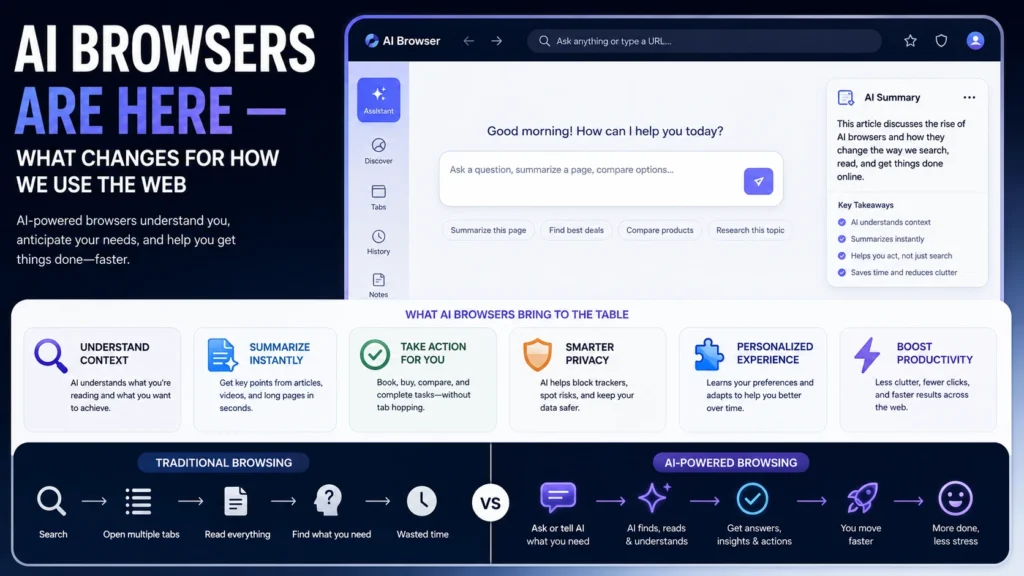
Browsers haven’t changed fundamentally in years. Type a URL, click links, open tabs, search when needed. Since 2025, a genuinely new category has emerged. It breaks that pattern entirely. It’s called the AI browser, and it’s changing what “browsing” actually means.
This isn’t a small feature update. It’s a real shift in who’s doing the clicking, and why.
What an AI Browser Actually Is
An AI browser integrates artificial intelligence directly into the browsing experience. At a basic level, that might mean summarizing a page. It can also answer questions about a page’s content. A more advanced version is called an agentic browser. It can actually take actions on your behalf. That includes filling out forms or navigating between pages.
Several agentic browsers emerged in 2025. The category has kept growing since then. OpenAI launched ChatGPT Atlas. Perplexity launched Comet. A browser called Dia joined the space too. Opera also previewed its own agentic browsing capabilities.
Established browsers took a different, less disruptive path. Microsoft Edge added Copilot as a built-in chatbot. Google Chrome added Gemini for some Windows desktop users. Firefox went further, supporting multiple chatbot providers. These include ChatGPT, Claude, Copilot, and Gemini.
What Actually Changes for How We Browse
The Browser Starts Doing Tasks, Not Just Displaying Pages
Traditional browsing puts every click on you. An agentic browser can navigate, fill forms, and complete tasks alone. You describe what you want. The browser handles the clicking and typing.
Search Behavior Shifts Toward Asking, Not Just Searching
Instead of typing keywords and scanning results, users increasingly just ask a question. The AI browser answers directly. Sometimes it pulls from multiple sources at once. That changes what “finding something” online actually feels like.
Tabs and Manual Research Start to Feel Optional
Comparing prices across ten tabs used to be normal. So did reading five articles to understand one topic. AI browsers can compile that comparison automatically instead. Often that happens in a single response. The tedious research legwork increasingly happens in the background.
Email, Shopping, and Scheduling Become Browser-Native Tasks
Some AI browsers can draft email replies or complete purchases. Others can build a study plan from an uploaded document. These used to be separate apps or manual processes. Now they can happen inside the same browsing session. The AI handles the task directly for you.
The Real Security Concern Behind the Convenience
This convenience comes with a genuinely serious, well-documented risk. AI browsers are vulnerable to something called prompt injection. Malicious content embedded in a webpage can hijack the AI’s instructions. This can happen entirely without your knowledge.
This isn’t a theoretical concern raised by just one source. The UK’s National Cyber Security Centre has warned against adoption. That warning applies mainly to most organizations right now. Gartner has echoed a similar risk assessment for enterprise use. Independent academic research has linked the vulnerability to malware and fraud. Disinformation risks have also been documented directly in that same research.
In practical terms, this means a compromised page could hijack the browser. It might act on hidden, malicious instructions without you noticing. That’s a meaningfully different risk than a browser simply rendering a page.
Not Every AI Browsing Tool Requires Switching Browsers
You don’t necessarily need to replace your existing browser entirely. Some tools work as extensions or companion apps instead. These add AI features on top of what you already use. One example works across Chrome, Edge, and other browsers directly. It doesn’t require a full switch to a new browser.
Other solutions run entirely in the cloud instead. No local installation is needed at all in that case. These systems typically use automation frameworks to control a remote browser. The AI reads the page’s underlying structure to understand it. Sometimes it also analyzes screenshots to know what to click.
Should You Actually Use One Right Now?
For low-stakes personal browsing, an AI browser can genuinely save time. For anything involving banking or passwords, real caution is warranted. Given the documented security concerns, many organizations are choosing to wait. Others are restricting use carefully instead of banning it outright. That caution isn’t paranoia; it reflects genuine findings from credible security researchers.
The Bottom Line
AI browsers represent a real shift in how the web gets used. Search is becoming conversational, and research is becoming automated. Routine tasks are increasingly getting delegated entirely to the browser itself. That shift brings genuine convenience, but also a real security tradeoff. Prompt injection isn’t a minor edge case in this category. It’s a serious, actively studied vulnerability across nearly every agentic browser. The right approach for now is enthusiasm balanced with real caution. That’s especially true for anything sensitive, like banking or private data.
Frequently Asked Questions
Are AI browsers safe to use for everyday browsing?
For low-stakes tasks like research, they’re generally reasonable to use. For sensitive tasks involving banking or passwords, extra caution is warranted right now.
What is prompt injection, in simple terms?
It’s when hidden instructions in a webpage trick an AI browser into acting. This can happen without you realizing anything unusual occurred at all.
Do I need to switch my entire browser to use AI features?
Not necessarily. Some tools add AI capabilities to your existing browser through an extension. Others run as separate agentic browsers, which does require switching entirely.
Which companies have released AI or agentic browsers so far?
OpenAI, Perplexity, and Opera have all released or previewed agentic browsing tools. Meanwhile, Microsoft Edge, Chrome, and Firefox added AI chat features to existing browsers.
Why are security experts warning organizations against AI browsers?
Documented research shows these tools are vulnerable to prompt injection attacks specifically. That vulnerability has been linked to real risks like malware, fraud, and disinformation.
Will AI browsers eventually replace traditional browsing entirely?
That’s genuinely unclear right now, and depends on how security concerns get addressed. For now, they’re best seen as a powerful but still-maturing new category.
