
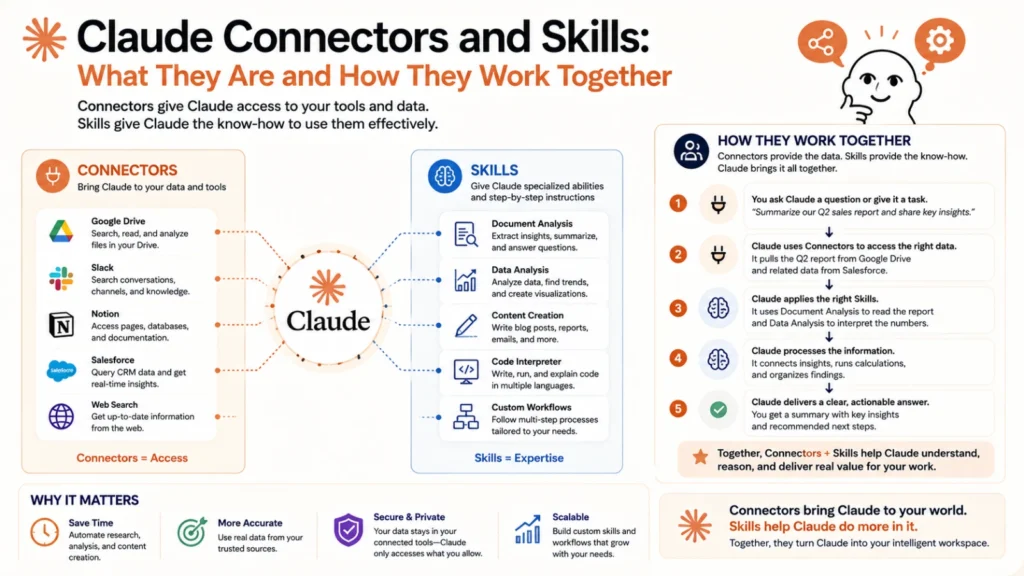
Claude on its own is already useful for writing, analysis, and reasoning. But real business workflows usually involve specific tools, company data, and repeatable specialized tasks. That’s exactly what connectors and skills are built to handle.
They solve two different problems. Connectors give Claude access to your actual tools and data. Skills give Claude specialized knowledge and instructions for a particular kind of task.
What Connectors Actually Are
Connectors link Claude to external tools and services using the Model Context Protocol, or MCP. Once connected, Claude can read from and sometimes act on that external system directly. Think of a connector as giving Claude a set of hands for a specific app.
Common categories include CRM platforms, communication tools, project management systems, and cloud storage. A connected CRM, for example, might let Claude search customer records or pull campaign analytics directly. A connected communication tool might let Claude search messages or draft a message for you to send.
Not every connector is available everywhere, and the marketplace changes over time. The most reliable way to see what’s currently available is checking your own connector settings directly. For Team and Enterprise accounts, admins control which connectors are enabled under Admin settings and Capabilities.
What Skills Actually Are
Skills are installable, specialized instructions that teach Claude how to handle a specific type of task well. Rather than relying on general knowledge alone, a skill gives Claude detailed, purpose-built guidance for that job.
Some skills are built directly by Anthropic and cover common document work. Examples include working with Word documents, PDFs, PowerPoint presentations, and Excel spreadsheets. Others help with things like scheduling recurring tasks or applying a visual theme to a document.
Beyond that, skills can also come bundled inside plugins built by third parties. These often target a specific professional domain, like SEO, sales outreach, or lead enrichment. A plugin might bundle several related skills together under one installable package.
Skills are typically triggered using a slash command, like typing a forward slash followed by the skill’s name. Claude can also recognize when a skill applies based on what you’re asking for naturally.
How Connectors and Skills Work Together
The real power usually comes from combining both. A connector gives Claude access to real data from your actual tools. A skill gives Claude the specialized know-how to do something useful with that data.
For example, a CRM connector might supply real customer records to Claude directly. A sales-focused skill could then use that data to draft a properly structured outreach sequence. Neither piece alone would accomplish quite the same thing on its own.
Examples of Skill Categories in Practice
Document creation skills handle building polished Word documents, PDFs, slide decks, and spreadsheets from scratch. These are commonly used, native Anthropic skills available across most Claude setups.
SEO and content skills cover tasks like site audits, keyword clustering, schema markup generation, and content brief creation. These typically arrive bundled inside a marketing-focused plugin rather than as a default feature.
Sales and lead generation skills can enrich contact details, build prospect lists, and manage outreach sequences. These often pair naturally with a connected CRM or sales tool for real data.
Plugin management skills help customize, configure, or even build entirely new plugins for a specific team’s workflow. This is useful for organizations wanting to package their own internal processes.
Finding What’s Actually Available to You
Since the marketplace evolves, the best approach is checking directly rather than assuming. Ask what skills or plugins you have installed, and a list should render for you. Ask what connectors are currently connected, and the same applies there. If something you need doesn’t exist yet, searching the plugin and connector marketplace is a reasonable next step.
The Bottom Line
Connectors and skills solve two related but distinct problems for Claude. Connectors bring in real data and access from your actual tools and services. Skills bring specialized, purpose-built instructions for handling a particular kind of task well. Together, they turn a general-purpose assistant into something meaningfully closer to a tool built specifically around your own workflow.
Frequently Asked Questions
Do I need both a connector and a skill to get value from Claude?
No. Many tasks work fine with just Claude’s general capabilities, or with just a skill and no connected data. Connectors matter most when a task genuinely needs your real, live data rather than general knowledge.
Are skills and connectors free to use?
This varies. Some skills and connectors are included by default, while others come from third-party plugins with their own terms. Always check the specific plugin or connector’s details before assuming cost or access.
Can I build my own custom skill or plugin?
Yes, in many setups. There are tools specifically for creating new skills and plugins from scratch. This is especially useful for teams wanting to package their own internal playbooks or workflows.
How do I know if a connector is actually working correctly?
If a connector requires authentication and hasn’t been set up yet, Claude typically can’t use its tools successfully. Checking your connector settings directly is the most reliable way to confirm active, working access.
What happens if I ask Claude to do something without an available connector?
Claude will generally say so honestly rather than pretending to have access it doesn’t have. It may suggest searching the marketplace for a relevant connector instead, if one might help.
Is it safe to connect sensitive business tools to Claude?
Generally yes for reputable, officially supported connectors, though it depends on your organization’s specific policies. Team and Enterprise admins can control exactly which connectors are enabled for their organization.
