
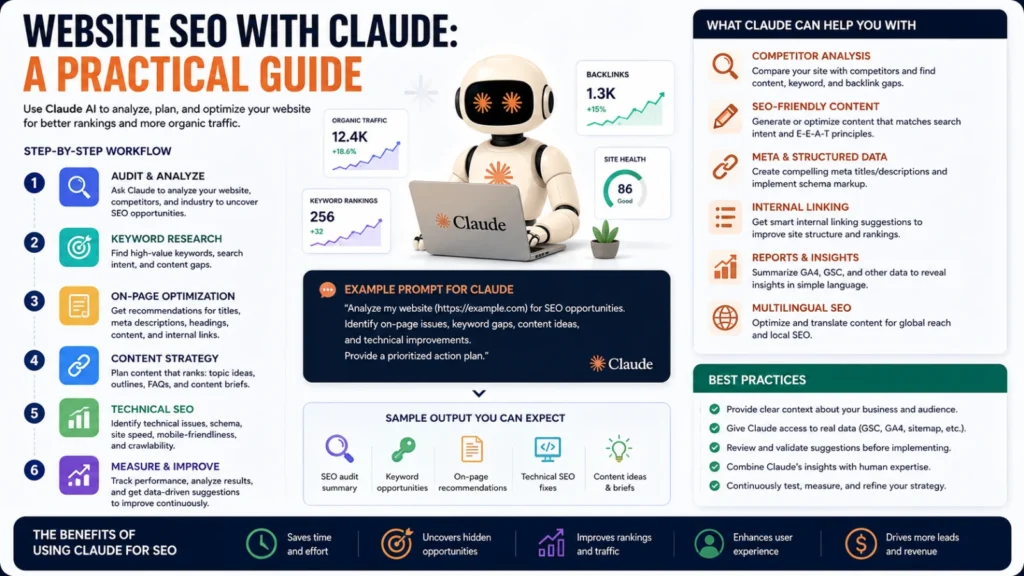
SEO work has always involved a lot of repetitive, detail-heavy tasks. Writing meta descriptions, checking heading structure, drafting content briefs, and building schema markup all take real time. Claude has become a genuinely useful tool for speeding up exactly this kind of work.
This isn’t about replacing your SEO strategy or your judgment. It’s about using Claude to move faster through the parts of SEO that eat up hours without adding much strategic thinking.
What Claude Actually Does Well for SEO
Auditing a Page’s On-Page Elements
Claude can fetch a live page and review its title tag, meta description, heading structure, and image alt text. It can flag missing elements, awkward lengths, and structural issues like a heading hierarchy that skips levels. This turns a manual checklist review into a quick, guided pass.
Writing and Rewriting Meta Tags
Title tags and meta descriptions have strict length limits and need to include the right keywords naturally. Claude can draft several options quickly, each staying within recommended character counts. As a result, you save valuable time instead of writing and counting characters manually.
Drafting SEO-Optimized Content
Claude can write full articles structured around a target keyword and search intent. It can organize content into proper headings, include relevant subtopics, and avoid unnatural keyword stuffing. The output still needs human review, but it removes the blank-page problem entirely.
Generating Structured Data
Schema markup follows strict, specific formatting rules that are easy to get wrong manually. Claude can generate ready-to-paste JSON-LD code for FAQs, articles, products, and local business listings. This is one of the more mechanical tasks Claude handles reliably well.
Keyword Clustering and Content Planning
Given a list of keywords, Claude can group them into logical topic clusters mapped to specific pages. This helps avoid keyword cannibalization, where two pages compete against each other for the same search term.
Competitor Content Analysis
Claude can read a competitor’s page and summarize their positioning, structure, and messaging quickly. That’s useful for understanding what’s already ranking well before writing something meant to compete with it.
Explaining Technical SEO Concepts
Core Web Vitals, canonical tags, hreflang, and crawl budget can all feel confusing without context. Claude can explain these concepts clearly and connect them to your actual specific situation.
What Claude Can’t Do on Its Own
Pull Live Ranking or Traffic Data
Claude doesn’t have a direct connection to Google Search Console, Google Analytics, or paid keyword tools by default. Real search volume, ranking positions, and traffic numbers still need to come from those actual platforms. You can paste exported data in for Claude to analyze afterward.
Crawl an Entire Site Automatically
Claude can review individual pages you point it toward, but it isn’t a dedicated site-wide crawler. Large sites with thousands of pages still benefit from a proper crawler tool for full technical audits.
Push Changes Directly to Your Website
Claude can write the fixed title tag or corrected schema code, but it can’t publish that change itself. Someone still needs to copy that fix into the actual CMS or codebase.
Read Fully JavaScript-Rendered Pages Perfectly
Standard page fetching sometimes struggles with heavily JavaScript-rendered sites that load content dynamically after the page loads. A browsing tool that actually renders the page like a real browser handles this far better.
The Exact Skills and Connectors That Power This
Everything described above runs on a specific combination of native Claude tools and an installable SEO skill set. Here’s the detailed breakdown, so you know exactly what to look for.
Native Claude Tools (No Extra Setup Needed)
Web fetch and search let Claude retrieve a live page’s content, meta tags, and structure directly. This is the foundation every SEO task in this guide depends on.
Claude in Chrome renders pages like a real browser, including JavaScript-heavy content. This matters for auditing modern sites built on React, Vue, or similar frameworks.
Artifacts can turn one-off findings into a persisted, reopenable dashboard. This works well for a recurring site-health view rather than a single audit snapshot.
File handling lets you upload exported CSVs from Search Console, Analytics, or keyword tools directly. Claude can then analyze that real data even without a live connection to the source.
The SEO Skill Set (Installed as a Plugin)
These specific skills come from an SEO-focused plugin, not a default Claude feature. In this workspace, they’re part of the SearchFit.ai plugin, though your own marketplace may offer an equivalent set.
- SEO Audit — a full crawlability, meta tag, heading, schema, and internal linking review, scored 0-100.
- SEO Check — a fast, single-page pass/fail readout for quick spot-checks between full audits.
- Technical SEO — focused specifically on speed, Core Web Vitals, crawlability, and indexation issues.
- On-Page SEO — optimizes one specific page around a target keyword, intent, and audience.
- Broken Links — finds and helps fix dead internal and external links across a site.
- Keyword Clustering — groups a raw keyword list into topic clusters mapped to specific pages.
- Content Strategy — analyzes a site and builds a broader content gap and editorial roadmap.
- Content Brief — generates a detailed writing brief for one specific planned article.
- Create Topic — researches a topic and produces a full plan before anyone starts writing.
- Create Content — generates a complete SEO-optimized article with headings, meta tags, and schema.
- Schema Markup / Generate Schema — produces ready-to-paste JSON-LD structured data for a page.
- Internal Linking — analyzes site architecture for orphan pages and weak link distribution.
- AI Visibility — covers how a brand appears in AI-generated answers, sometimes called GEO or AEO.
- Content Translation / Translate Content — localizes content for international SEO with proper hreflang handling.
Connectors: The Honest Gap Right Now
This is worth being direct about. As of writing, there’s no dedicated connector for Google Search Console, Google Analytics, Ahrefs, Semrush, or Moz in the general marketplace. Searching the connector registry for these tools specifically turns up nothing purpose-built for SEO data.
The closest adjacent option is a HubSpot connector, which includes basic campaign analytics tools alongside its core CRM functions. It isn’t a substitute for dedicated SEO rank-tracking or keyword-volume data, since that isn’t its primary purpose.
In practice, this means live rank positions, real search volume, and historical traffic trends still require exporting a report from wherever that data actually lives. Once exported, Claude can analyze, cluster, and summarize that data directly. If a dedicated Search Console or Analytics connector appears in your own marketplace later, connecting it would close this specific gap.
A Practical Workflow Worth Trying
Start by asking Claude to review a specific page’s title tag, meta description, and headings. Then ask for two or three rewritten options that better target your actual keyword. Next, request a content gap analysis comparing your page against a top-ranking competitor. Use that gap analysis to expand or restructure your existing content directly. Finally, ask Claude to generate schema markup matching your page’s actual content type. Copy that code into your site, then verify it with a structured data testing tool afterward.
Getting Better Results from Claude
Being specific dramatically improves what Claude gives you back. Instead of “improve my SEO,” try naming the actual target keyword, audience, and search intent. Paste in your actual current content rather than describing it vaguely from memory. And always treat Claude’s SEO output as a strong draft, not a final, unreviewed answer.
The Bottom Line
Claude genuinely speeds up the repetitive, detail-heavy parts of SEO work that used to eat up hours. Writing meta tags, drafting content, generating schema, and clustering keywords are all things it handles well. What it can’t do is replace live data tools, crawl your entire site, or publish changes for you. Used as a fast, capable assistant alongside the right tools, it’s a genuinely useful part of a modern SEO workflow.
Frequently Asked Questions
Do I need to know SEO already to use Claude effectively for it?
No, but basic familiarity helps you ask better, more specific questions. Claude can also explain unfamiliar SEO concepts as you go, so you can learn while working.
Can Claude replace an SEO specialist entirely?
Not really. Claude speeds up execution and drafting, but strategy, prioritization, and judgment still benefit from real expertise. It’s best thought of as a capable assistant, not a full replacement for that experience.
How accurate is the SEO advice Claude gives?
Generally solid for well-established best practices like meta tag length and heading structure. For anything involving current algorithm specifics or live data, always verify against current documentation directly.
Can Claude help with local SEO specifically?
Yes. It can help draft location-specific content, generate LocalBusiness schema, and explain local SEO concepts like Google Business Profile optimization clearly.
Is it safe to paste my website’s content into Claude?
Generally yes for standard SEO work, though avoid pasting anything genuinely sensitive or confidential unless you’re comfortable doing so. Treat it like any other software tool handling your content.
Does Claude work better than dedicated SEO software?
They serve different purposes rather than directly competing. Dedicated SEO software excels at live data, rank tracking, and large-scale crawling; Claude excels at analysis, writing, and fast execution.
