
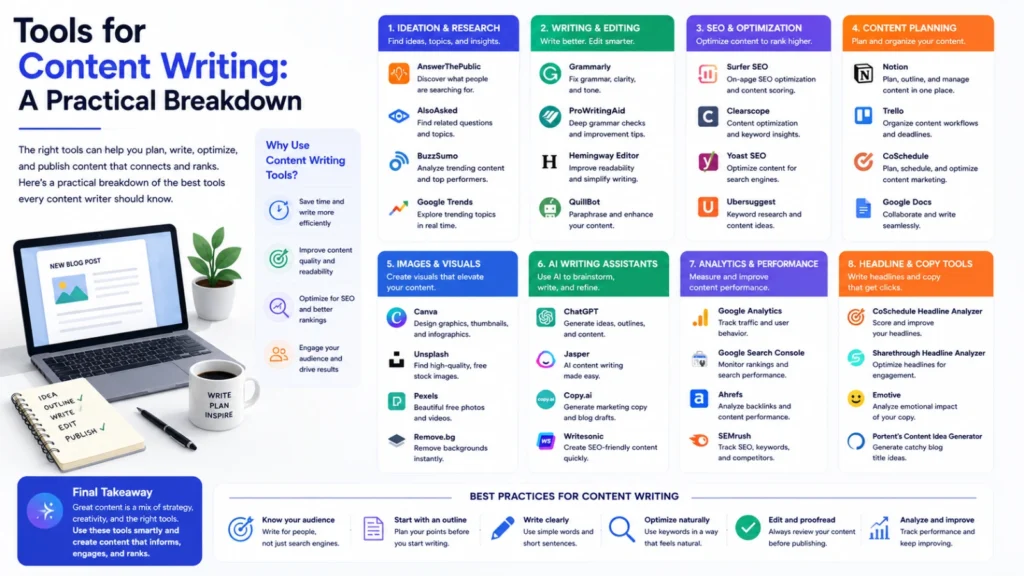
Good writing still starts with a person, not a tool. But the right tools remove friction along the way. They catch errors, sharpen structure, and speed up research. Here’s a breakdown of what each category actually does.
AI Writing Assistants
These tools help draft, outline, and rework content quickly. Claude, ChatGPT, and Gemini can generate full drafts from a simple brief. Jasper and Copy.ai focus specifically on marketing and ad copy. Writesonic offers similar templates for blogs, product pages, and emails. They can also rewrite tone, tighten sentences, or expand thin sections. Used well, they speed up the blank-page stage significantly. Used poorly, they produce generic, forgettable copy instead. The output still needs a human editing pass afterward.
Grammar and Style Checkers
Grammarly and ProWritingAid catch spelling, grammar, and punctuation errors. Both now use AI features to suggest tone and clarity fixes. They also flag passive voice and overly complex sentences. These tools work as a safety net, not a full editor. They won’t catch weak arguments or unclear structure though. Pairing them with a human read-through still matters.
Readability Tools
Hemingway Editor highlights long, hard-to-follow sentences directly. It flags adverbs, passive voice, and needlessly complex phrasing. This matters more for web content than academic writing. Shorter, clearer sentences generally perform better in search and AI answers. It’s a quick pass, not a full rewrite tool.
SEO Content Tools
Surfer SEO, Clearscope, and Frase analyze top-ranking pages for a keyword. All three use AI to generate outlines and content briefs. They suggest related terms and ideal content length too. These tools help ensure a page covers a topic thoroughly. They shouldn’t dictate the entire structure of an article though. Genuine expertise and clarity still matter more than keyword coverage alone.
Plagiarism and Originality Checkers
Copyscape and similar tools scan content against published web pages. They flag matching text that could look like duplication. This matters for both ethics and search engine trust. It’s especially useful when multiple writers contribute to one site. Running a check before publishing is a simple, worthwhile habit.
Outlining and Research Tools
Notion AI and Google Docs support structured drafting and easy collaboration. Perplexity is increasingly used for fast, sourced topic research too. These AI features can summarize source material quickly and reliably. This helps writers organize research before writing a single sentence. Good structure upfront usually means less rewriting later. It also keeps long-form pieces from wandering off topic.
Collaboration and Editing Platforms
Google Docs and similar tools support real-time commenting and edits. This matters most when multiple people review one piece of content. Version history also protects against accidentally losing earlier drafts. For teams, this collaboration layer often matters more than any single writing feature.
Choosing the Right Combination
No single tool covers every stage of content writing well. A realistic workflow combines a few tools, not just one. Use an AI assistant like Claude for drafting, Grammarly for cleanup. Add Surfer SEO for coverage, and Copyscape before publishing. The combination matters more than any individual tool’s features.
The Bottom Line
Content writing tools speed up drafting, editing, and research substantially. They don’t replace judgment, expertise, or a genuine point of view. The best results come from treating tools as support, not a shortcut. Writers who combine a few tools thoughtfully consistently produce stronger, faster work.
Frequently Asked Questions
Can AI writing tools completely replace a human writer?
Not reliably. They speed up drafting but still need human judgment and editing. Genuine expertise and a clear point of view still matter most.
Which tool should I use first when starting a new piece?
Start with an outlining or research tool to organize your ideas first. Add an AI assistant afterward to help draft from that structure.
Do SEO content tools guarantee better search rankings?
No. They help ensure thorough topic coverage and relevant terms. Actual rankings still depend on quality, authority, and technical site health.
Is a grammar checker enough for proofreading an article?
Not entirely. It catches obvious errors but misses weak structure or unclear arguments. A human read-through still catches issues these tools can’t.
Why does plagiarism checking matter if I wrote the content myself?
Unintentional overlap with existing pages can still happen during research. A quick check protects both originality and search engine trust.
Are free versions of these tools usually good enough?
Free versions often cover basic needs like spelling and simple grammar. Paid versions typically add deeper style, SEO, or collaboration features.
