
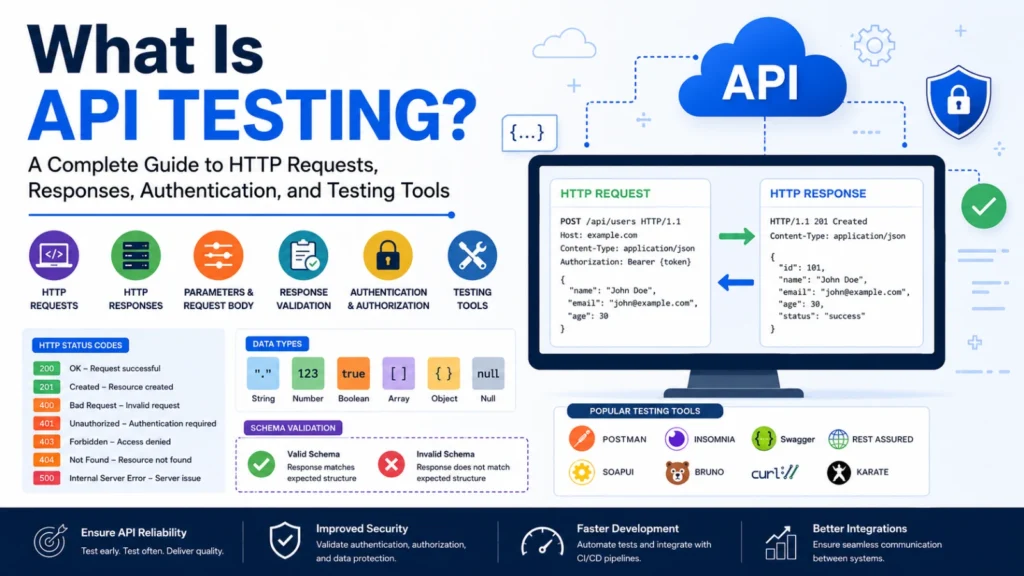
Meta Title: What Is API Testing? A Complete Beginner’s Guide (2026)
Meta Description: Learn API testing, HTTP requests and responses, parameters, request bodies, response validation, status codes, authentication, authorization, schema validation, and the best API testing tools.
What Is API Testing?
API testing is the process of verifying that an Application Programming Interface (API) functions correctly, securely, reliably, and efficiently. Instead of testing a user interface, API testing focuses on the communication between software systems.
Modern applications rely heavily on APIs to exchange data. Whether you’re using a mobile banking app, booking a hotel online, or checking the weather, APIs work behind the scenes to send requests and receive responses.
API testing ensures that:
- APIs return the correct data.
- Business logic works as expected.
- Invalid requests are handled properly.
- Authentication and authorization are enforced.
- Performance remains consistent.
- Applications integrate seamlessly.
What Is an API?
An Application Programming Interface (API) is a set of rules that allows two software applications to communicate.
For example:
A food delivery app sends a request to the restaurant’s system.
The restaurant responds with:
- Available menu
- Prices
- Delivery time
- Order status
The API acts as the messenger between the two systems.
Why Is API Testing Important?
API testing offers several advantages over UI testing.
Faster Testing
APIs execute much faster than browser-based UI tests.
Early Bug Detection
Developers can test APIs before the frontend is completed.
Better Reliability
API tests verify the application’s core business logic.
Improved Security
Authentication, authorization, and data protection can be validated.
Easier Automation
API tests integrate well into CI/CD pipelines for continuous testing.
Understanding HTTP
Most web APIs communicate using HTTP (Hypertext Transfer Protocol).
A client sends an HTTP request to a server.
The server processes the request and returns an HTTP response.
Client
   │
HTTP Request
   │
Server
   │
HTTP Response
   │
Client
HTTP Request
An HTTP request contains everything the server needs to process a request.
It typically includes:
- URL
- HTTP Method
- Headers
- Parameters
- Request Body
- Authentication
Example:
POST /api/users HTTP/1.1
Host: example.com
Authorization: Bearer token123
Content-Type: application/json

{
   "name":"John",
   "email":"john@example.com"
}
HTTP Methods
GET
Retrieves data.
Example:
GET /productsReturns:
- Product list
- User details
- Order information
POST
Creates new data.
Example:
POST /usersCreates a new user.
PUT
Updates an entire resource.
Example:
PUT /users/5PATCH
Updates only selected fields.
Example:
PATCH /users/5DELETE
Removes a resource.
Example:
DELETE /users/5HTTP Response
The server returns an HTTP response after processing the request.
A response includes:
- Status code
- Headers
- Response body
Example:
HTTP/1.1 200 OK

{
   "id":5,
   "name":"John",
   "email":"john@example.com"
}
Parameters in API Testing
Parameters pass information from the client to the server.
Path Parameters
Included within the URL.
Example:
GET /users/25Here:
25is the path parameter.
Query Parameters
Added after a question mark (?).
Example:
GET /products?page=2&limit=20Common uses:
- Pagination
- Filtering
- Searching
- Sorting
Header Parameters
Sent in request headers.
Example:
Authorization: Bearer tokenOther examples:
- Content-Type
- Accept
- User-Agent
Request Body
The request body carries data to the server.
Usually used with:
- POST
- PUT
- PATCH
Example JSON:
{
   "name":"Sarah",
   "email":"sarah@example.com",
   "age":28
}
Response Validation
Response validation verifies that the API returns the expected result.
Common checks include:
- Correct status code
- Correct response time
- Expected fields
- Correct values
- Data types
- Response schema
- Headers
Example assertions:
- Status is 200
- Name equals “Sarah”
- Email exists
- ID is numeric
Data Types
Every API field has a data type.
Common JSON data types include:
| Data Type | Example |
|---|---|
| String | “John” |
| Number | 45 |
| Boolean | true |
| Array | [“A”,”B”] |
| Object | {“id”:1} |
| Null | null |
Testing ensures the API returns the correct data types.
Schema Validation
Schema validation verifies that the response follows a predefined structure.
Example schema:
{
  "id": "number",
  "name": "string",
  "email": "string"
}
If the API returns:
{
   "id":"ABC"
}
The test fails because id should be a number.
Schema validation catches structural issues before they affect applications.
HTTP Status Codes
Status codes indicate whether a request succeeded or failed.
200 OK
Request completed successfully.
201 Created
A new resource was created.
204 No Content
The request succeeded, but there is no response body.
400 Bad Request
The client sent an invalid request.
401 Unauthorized
Authentication is missing or invalid.
403 Forbidden
Authentication succeeded, but the user lacks permission.
404 Not Found
The requested resource does not exist.
405 Method Not Allowed
The HTTP method is not supported.
409 Conflict
A duplicate or conflicting resource exists.
500 Internal Server Error
An unexpected server error occurred.
503 Service Unavailable
The server is temporarily unavailable.
Authentication vs Authorization
These terms are often confused, but they serve different purposes.
Authentication
Authentication answers:
Who are you?
It verifies a user’s identity.
Common authentication methods include:
- API Keys
- Bearer Tokens
- JWT (JSON Web Tokens)
- OAuth 2.0
- Basic Authentication
Example:
Authorization: Bearer eyJhbGciOi...Authorization
Authorization answers:
What are you allowed to do?
Examples:
- Admin can delete users.
- Customer can view only their own orders.
- Manager can approve payments.
A user may be authenticated but still not authorized to perform certain actions.
API Testing Scenarios
A comprehensive API test suite should include:
- Positive testing
- Negative testing
- Boundary value testing
- Authentication testing
- Authorization testing
- Response validation
- Schema validation
- Performance testing
- Error handling
- Security testing
Popular API Testing Tools
Postman
One of the most popular API testing tools.
Features:
- Manual testing
- Collections
- Environment variables
- Automation
- Mock servers
- API documentation
Best for beginners and professionals.
Insomnia
A lightweight API client with an intuitive interface.
Supports:
- REST
- GraphQL
- gRPC
Swagger (OpenAPI)
Useful for:
- API documentation
- Interactive testing
- API design
REST Assured
A Java library for automated API testing.
Ideal for:
- Selenium integration
- CI/CD pipelines
- Regression testing
SoapUI
Supports:
- REST APIs
- SOAP APIs
- Security testing
- Load testing
Suitable for enterprise environments.
Bruno
An open-source API client that stores collections as plain text files, making it version-control friendly.
cURL
A command-line tool for sending HTTP requests.
Example:
curl https://api.example.com/usersIdeal for quick API testing and automation scripts.
API Testing Best Practices
- Validate both successful and failed responses.
- Verify status codes for every endpoint.
- Check response time and performance.
- Validate JSON schemas.
- Use realistic test data.
- Test authentication and authorization separately.
- Automate repetitive API tests.
- Keep test cases independent.
- Include edge cases and invalid inputs.
- Integrate API tests into CI/CD pipelines.
Common API Testing Mistakes
- Testing only successful scenarios
- Ignoring error responses
- Skipping schema validation
- Hardcoding test data
- Not validating response headers
- Ignoring security testing
- Using expired authentication tokens
- Overlooking rate limiting and throttling
Conclusion
API testing is a critical part of modern software development. By validating HTTP requests and responses, parameters, request bodies, data types, schemas, status codes, authentication, and authorization, teams can ensure that APIs are secure, reliable, and ready for production. Whether you’re a beginner using Postman or an automation engineer working with REST Assured, mastering API testing helps you build higher-quality applications, reduce defects, and accelerate software delivery.
Frequently Asked Questions (FAQs)
What is API testing?
API testing verifies that an application programming interface functions correctly by checking requests, responses, business logic, security, and performance without relying on the user interface.
What is the difference between authentication and authorization?
Authentication verifies a user’s identity, while authorization determines what resources or actions that authenticated user is allowed to access.
Which HTTP methods are most commonly used in API testing?
The most common methods are GET (retrieve data), POST (create data), PUT (replace data), PATCH (partially update data), and DELETE (remove data).
Why is schema validation important?
Schema validation ensures that API responses follow the expected structure and data types, preventing integration issues and unexpected application behavior.
Which API testing tool is best for beginners?
Postman is widely considered the best tool for beginners because it offers an intuitive interface, supports automation, and includes features such as collections, environment variables, and API documentation.
