
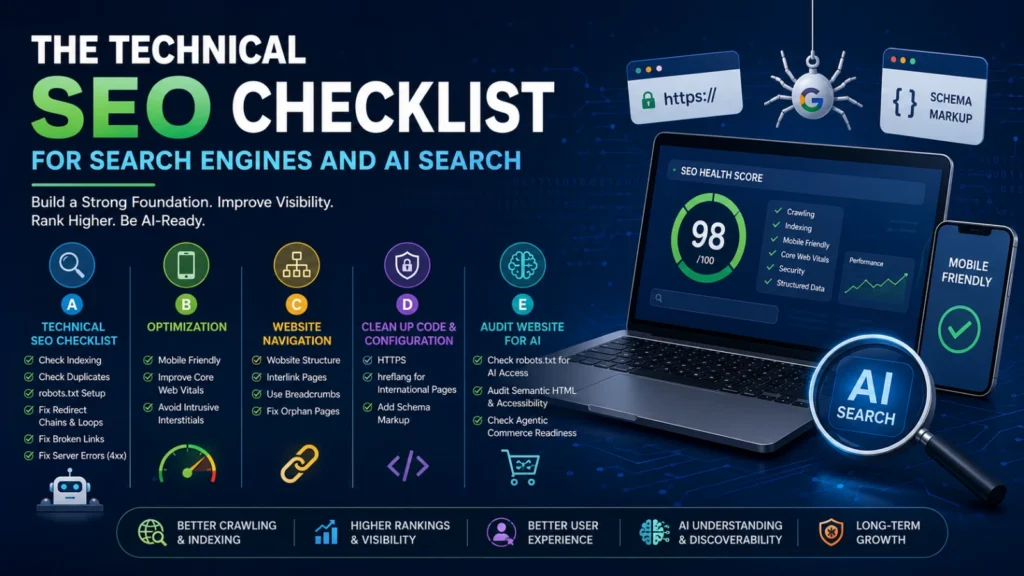
Search engines and AI search systems both rely on technically sound websites. Strong technical SEO improves crawling, indexing, user experience, and content understanding. It also helps AI assistants retrieve reliable information for answers and recommendations.
This checklist covers the most important technical improvements for both traditional search engines and AI-powered search.
Why Technical SEO Matters
Technical SEO creates a strong foundation for your website. Great content cannot perform well if search engines cannot crawl, index, or understand it.
AI search platforms also prefer websites with clear structures, fast loading times, and accessible content.
A. Technical SEO Checklist
1. Check Whether Your Website Is Indexed
Start by confirming that search engines index your pages.
Search Google using:
site:yourdomain.comIf important pages are missing, investigate the cause.
Common reasons include:
- Noindex tags
- Blocked robots.txt rules
- Crawl errors
- Poor internal linking
Submit updated sitemaps through Google Search Console and Bing Webmaster Tools.
2. Check for Duplicate Versions of Your Website
Search engines should index only one version of your website.
Verify that these versions redirect correctly:
- https://example.com
- https://www.example.com
- http://example.com
- http://www.example.com
Duplicate versions split ranking signals and confuse crawlers.
Use canonical tags to identify the preferred page.
3. Configure robots.txt Properly
Your robots.txt file guides search engine crawlers.
Allow important pages while blocking unnecessary areas.
A typical WordPress setup includes:
- Allow public pages
- Block
/wp-admin/ - Allow
admin-ajax.php - Include the sitemap URL
Avoid blocking pages that should appear in search results.
4. Fix Redirect Chains and Loops
Redirect chains slow page loading and waste crawl budget.
Redirect loops prevent crawlers from reaching the destination page.
Each redirected URL should point directly to the final page.
5. Fix Broken Links
Broken links create poor user experiences.
They also reduce crawl efficiency.
Check both internal and external links regularly.
Replace or remove broken links immediately.
6. Fix Server Errors
Server errors prevent crawlers from accessing content.
Monitor errors including:
- 404 Not Found
- 410 Gone
- 500 Internal Server Error
- 503 Service Unavailable
Resolve recurring issues before they affect rankings.
B. Website Optimization
1. Make Your Website Mobile Friendly
Google primarily indexes mobile versions of websites.
Every page should display correctly on all screen sizes.
Buttons, menus, and forms should remain easy to use.
2. Improve Core Web Vitals
Core Web Vitals measure real user experience.
Focus on improving:
- Largest Contentful Paint (LCP)
- Interaction to Next Paint (INP)
- Cumulative Layout Shift (CLS)
Optimize images, caching, and JavaScript to improve scores.
3. Avoid Intrusive Interstitials
Large popups interrupt user experience.
Search engines may reduce rankings for intrusive interstitials.
Use banners or delayed popups instead.
C. Improve Website Navigation
1. Build a Logical Website Structure
Organize pages into clear categories.
Users should reach important pages within a few clicks.
Simple navigation improves crawling and usability.
2. Interlink Related Pages
Internal links help search engines discover content.
They also distribute page authority across your website.
Link related articles and service pages naturally.
3. Use Breadcrumb Navigation
Breadcrumbs improve navigation for users.
They also provide search engines with additional page context.
Add Breadcrumb Schema whenever possible.
4. Fix Orphan Pages
Orphan pages receive no internal links.
Search engines often struggle to discover them.
Link every important page from relevant sections.
D. Clean Up Your Website’s Code and Configuration
1. Use HTTPS
HTTPS protects user data.
Search engines also consider HTTPS a ranking signal.
Install a valid SSL certificate.
Redirect every HTTP page to HTTPS.
2. Add hreflang for International Websites
International websites need hreflang tags.
These tags show the correct language or region.
Proper implementation prevents duplicate content issues.
3. Add Structured Schema Markup
Schema markup helps search engines understand content.
Use structured data for:
- Organization
- Local Business
- Product
- FAQ
- Article
- Breadcrumb
- Review
Schema also improves AI understanding.
E. Audit Your Website for AI Search
1. Check AI Retrieval Access
Review your robots.txt configuration.
Allow trusted AI crawlers when appropriate.
Also create an llms.txt file for AI systems.
Provide accurate company and content information.
2. Audit Semantic HTML and Accessibility
Semantic HTML improves machine understanding.
Use proper heading hierarchy.
Structure pages with:
- One H1
- Logical H2 sections
- Supporting H3 headings
Use descriptive image alt text.
Ensure accessibility standards remain high.
AI systems understand structured pages more accurately.
3. Check Agentic Commerce Readiness
AI agents increasingly perform shopping and research tasks.
Your website should expose structured product information.
Include pricing, availability, specifications, and contact details.
Maintain consistent information across every platform.
Final Thoughts
Technical SEO supports both traditional search engines and AI search platforms.
Fast, accessible, and well-structured websites perform better across every discovery channel.
Regular technical audits help protect rankings while improving user experience.
As AI search continues evolving, technical SEO remains one of the strongest long-term investments.
Frequently Asked Questions
What is technical SEO?
Technical SEO improves your website’s infrastructure. It helps search engines crawl, index, and understand your content efficiently.
How often should I perform a technical SEO audit?
Audit your website every three to six months. Larger websites may benefit from monthly technical reviews.
Does technical SEO affect AI search?
Yes. AI systems prefer fast, accessible, structured websites with clear semantic markup and reliable information.
What is robots.txt?
The robots.txt file tells crawlers which areas they may access or avoid. It also points crawlers to your sitemap.
What are Core Web Vitals?
Core Web Vitals measure loading speed, responsiveness, and visual stability. They directly affect user experience.
What is an orphan page?
An orphan page has no internal links pointing to it. Search engines often struggle to discover these pages.
Why is schema markup important?
Schema provides structured information about your content. It improves search visibility and helps AI interpret your pages.
What is llms.txt?
llms.txt is an optional file that helps AI systems locate important information about your website and content. It complements technical SEO but does not replace it.
What is agentic commerce readiness?
Agentic commerce readiness means your website provides structured data that AI assistants can use for product discovery, comparisons, and purchasing decisions.
